Global tile and undo hotkeys
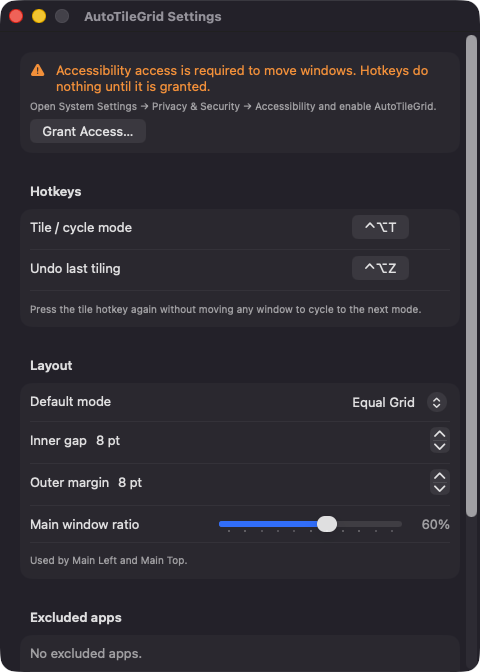
Tile with Control-Option-T and restore the previous window positions with Control-Option-Z. Both are rebindable with a click-to-record field in Settings.

Open source · macOS 14+ · Universal binary · Window Management
Press Control-Option-T and every standard window on your current screen snaps into a tidy grid. Press it again to cycle layouts, or Control-Option-Z to undo.
Free & MIT licensed · Apple Silicon & Intel · Latest release
Features
AutoTileGrid does one job, arranging the windows on your current screen, and gives you just enough control to make it yours.
Tile with Control-Option-T and restore the previous window positions with Control-Option-Z. Both are rebindable with a click-to-record field in Settings.
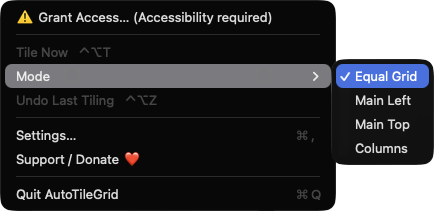
Choose Equal Grid, Main Left, Main Top or Columns. Press the tile hotkey again without moving anything to jump to the next layout.
Set the inner gap from 0 to 64 pt, the outer margin from 0 to 128 pt, and the main window share from 30 to 80 percent for the two main layouts.
Only standard, non-minimized, non-fullscreen windows on that screen are arranged. Dialogs are skipped, and you can exclude any app from tiling.
Windows are ordered by their current top-left position, so they do not jump around between runs. A brief on-screen label names the layout applied.
Tile Now, a Mode submenu, Undo Last Tiling and Settings are one click away. A launch at login toggle keeps it ready.
Screenshots
Install
AutoTileGrid is open source and not notarized with a paid Apple Developer ID, so macOS needs one extra step the first time.
xattr -cr /Applications/AutoTileGrid.app
Download
Free, forever. Built for macOS 14 Sonoma or newer, Apple Silicon and Intel.
Not notarized: on first launch right-click AutoTileGrid.app → Open.
FAQ
Yes. It is released under the MIT license, with no accounts, ads or paid tier. If it saves you time, there is an optional Support button that opens a Ko-fi page.
Only Accessibility, which is how macOS lets an app list other windows and set their position and size. Without it the hotkeys do nothing and the menu shows a Grant Access row. It does not request Screen Recording or Microphone access.
Your preferences, such as hotkeys, layout mode, spacing and excluded apps, are saved locally on your Mac. The positions used for undo are kept in memory only. The app makes no network connections and has no telemetry.
Notarization requires a paid Apple Developer account, and this is a free project. Right-click the app and choose Open once to launch it, or build it from source with Xcode and XcodeGen.
Support ❤️
AutoTileGrid is a free, open-source alternative to paid utilities. If it earns a spot on your Mac, a coffee keeps the updates coming.
☕ Support Or on Ko-fi