Menu bar gauge
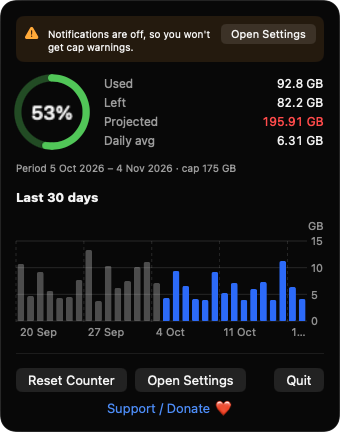
Show a ring, a percentage, or both. The color shifts toward amber and red as your usage grows.
Open source · macOS 14+ · Universal binary · System Monitoring
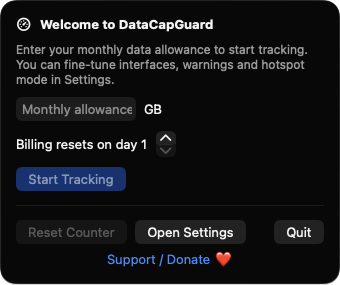
Set your monthly allowance and DataCapGuard keeps a live gauge in your menu bar, projects your month-end total, and warns you before you reach the cap.
Free & MIT licensed · Apple Silicon & Intel · Latest release
Features
DataCapGuard does one job, tracking usage against your monthly cap, and keeps everything on your Mac.
Show a ring, a percentage, or both. The color shifts toward amber and red as your usage grows.
See used, left, projected and daily average, plus a Swift Charts bar chart of the last 30 days. The projection turns red if it would exceed your cap.
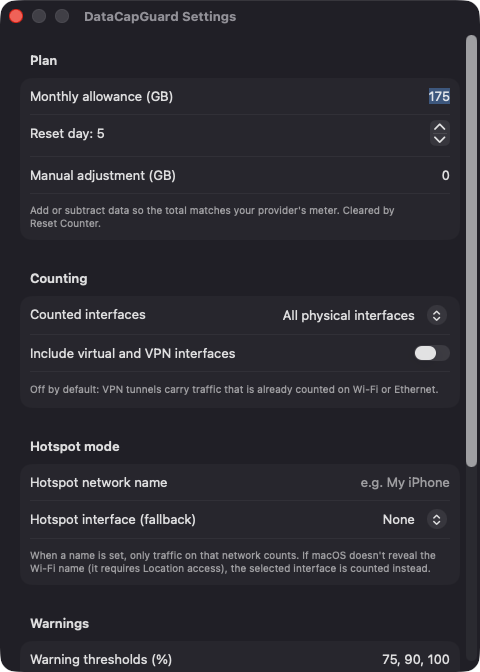
Get notified at 75, 90 and 100 percent by default, or pick your own. Each warning fires once per billing period.
Count all physical interfaces, Wi-Fi only, or Ethernet only. VPN and virtual interfaces are excluded by default to avoid double counting.
Enter a network name such as your iPhone and only traffic on that network counts, so home usage never mixes in.
Samples every 5 seconds and right after wake, treats counter resets as a new baseline, and keeps daily totals across reboots. A manual adjustment lets you match your provider's meter.
Screenshots
Install
DataCapGuard is open source and not notarized with a paid Apple Developer ID, so macOS needs one extra step the first time.
xattr -cr /Applications/DataCapGuard.app
Download
Free, forever. Built for macOS 14 Sonoma or newer, Apple Silicon and Intel.
Not notarized: on first launch right-click DataCapGuard.app → Open.
FAQ
Yes. It is released under the MIT license, with no accounts, subscriptions or in-app purchases. The source is on GitHub, and there is an optional Support button if you want to chip in.
Notifications, so it can warn you at your thresholds if you decline, it still tracks usage and shows a banner. Location is optional and only affects Hotspot mode, because macOS may hide the Wi-Fi name without it. It never asks for Accessibility, Screen Recording or Microphone access.
Only on your Mac. Daily usage totals are saved as a JSON file in Application Support, and the app reads per-interface byte counters, never the contents of your traffic. Nothing is sent to any server.
Notarization requires a paid Apple Developer account, which this free project does not have. Right-click the app and choose Open once to launch it, or build it from source with Xcode.
Yes. DataCapGuard was generated by Claude Code from a written spec as a clean-room reimplementation, with no code or assets from any commercial app. The full source is on GitHub under MIT, so you can read every line before you run it. It has had less human review than a hand-written app, so bug reports are welcome.
Support ❤️
DataCapGuard is a free, open-source alternative to paid utilities. If it earns a spot on your Mac, a coffee keeps the updates coming.
☕ Support Or on Ko-fi