Wallpaper cover, Finder untouched
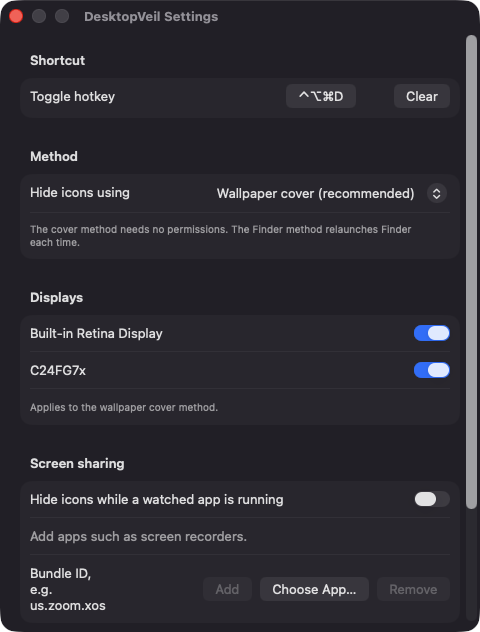
A borderless window per display draws your current wallpaper over the icons. It follows fill, fit, stretch and center scaling, and needs no permissions.
Open source · macOS 14+ · Universal binary · Menu Bar Utility
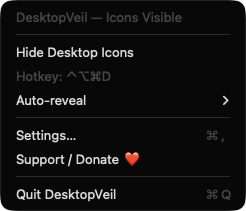
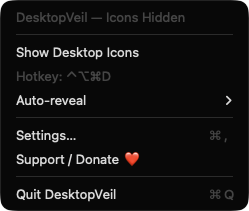
DesktopVeil hides every desktop icon from your menu bar for clean screenshots, recordings and screen sharing. Click the icon or press the hotkey, Control-Option-Command-D by default.
Free & MIT licensed · Apple Silicon & Intel · Latest release
Features
Everything you need to hide desktop clutter on demand, and nothing that needs your data or permissions.
A borderless window per display draws your current wallpaper over the icons. It follows fill, fit, stretch and center scaling, and needs no permissions.
Toggle from anywhere with Control-Option-Command-D, or record your own shortcut in Settings. You can also clear it.
Choose which displays get covered. Covers are rebuilt when displays or Spaces change, and the wallpaper is re-read every minute for rotating wallpapers.
Have your icons come back by themselves after 5 minutes, 15 minutes or 1 hour, so you never forget they are hidden.
Keep an editable list of app bundle identifiers, such as Zoom or a screen recorder. Icons hide when one launches and return when the last one quits.
Switch to the Finder preference method if you prefer it. If the app quits uncleanly in that mode, the next launch offers to restore your icons.
Screenshots
Install
DesktopVeil is open source and not notarized with a paid Apple Developer ID, so macOS needs one extra step the first time.
xattr -cr /Applications/DesktopVeil.app
Download
Free, forever. Built for macOS 14 Sonoma or newer, Apple Silicon and Intel.
Not notarized: on first launch right-click DesktopVeil.app → Open.
FAQ
Yes. It is released under the MIT license, with no accounts, no analytics and no network access. If it saves you time, there is an optional Support button in the app.
None of the privacy permissions. It does not use Accessibility, Screen Recording, Microphone or Camera. The hotkey uses a Carbon API that needs no Accessibility access, and the cover only reads your wallpaper path through NSWorkspace.
Settings are kept locally in macOS user defaults on your Mac. Nothing is sent anywhere. In Finder mode, the app also changes Finder's own CreateDesktop preference and restores it when you quit.
Notarization requires a paid Apple Developer account, and this is a free project. Right-click the app and choose Open once to run it, or build it from source with Xcode and XcodeGen.
Support ❤️
DesktopVeil is a free, open-source alternative to paid utilities. If it earns a spot on your Mac, a coffee keeps the updates coming.
☕ Support Or on Ko-fi