A layout per monitor setup
Each arrangement is identified by every display's UUID, pixel size and position, so layouts survive port changes.
Open source · macOS 14+ · Universal binary · Window Management
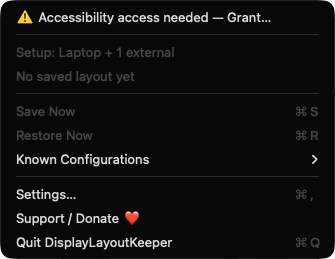
DisplayLayoutKeeper saves window positions for each monitor setup and restores them when you dock, undock or wake your Mac. It lives in the menu bar Save Now is ⌘S, Restore Now is ⌘R.
Free & MIT licensed · Apple Silicon & Intel · Latest release
Features
Everything runs locally, with no accounts, servers or telemetry.
Each arrangement is identified by every display's UUID, pixel size and position, so layouts survive port changes.
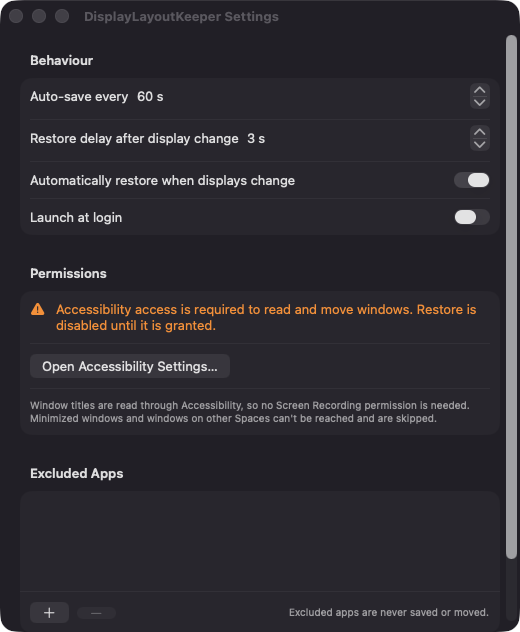
Windows are saved every 60 seconds by default (10 to 600), once the setup has been stable for 5 seconds, and again just before sleep.
After a configurable delay (3 seconds by default), windows return to their saved frames. Positions are clamped onto the nearest connected display.
Windows match by app bundle ID and exact title, then fall back to window index. That keeps browser windows with changing tab titles in place.
Pick apps from /Applications that should never be saved or moved. Launch at login and auto-restore are simple toggles in Settings.
Layouts are stored as JSON files on your Mac, capped at 20 configurations. Screen Recording is not requested.
Screenshots
Install
DisplayLayoutKeeper is open source and not notarized with a paid Apple Developer ID, so macOS needs one extra step the first time.
xattr -cr /Applications/DisplayLayoutKeeper.app
Download
Free, forever. Built for macOS 14 Sonoma or newer, Apple Silicon and Intel.
Not notarized: on first launch right-click DisplayLayoutKeeper.app → Open.
FAQ
Yes. It is free and released under the MIT license, with the full source on GitHub. If it saves you some headaches, you can support development through the Ko-fi link in the app.
Accessibility is required so the app can read window titles, positions and sizes and move windows on restore. Notifications are optional and used only for a short confirmation after an automatic restore. It does not ask for Screen Recording, Camera or Microphone.
Only on your Mac, in Application Support under DisplayLayoutKeeper/Snapshots, as one JSON file per monitor configuration. Nothing is sent anywhere, and you can delete any saved layout from the menu.
Notarization requires a paid Apple Developer account, which this free project does not have. Right-click the app and choose Open once to approve it, or build it yourself from source with Xcode.
Support ❤️
DisplayLayoutKeeper is a free, open-source alternative to paid utilities. If it earns a spot on your Mac, a coffee keeps the updates coming.
☕ Support Or on Ko-fi