Live RPM in the menu bar
Show the highest fan RPM, a fan glyph, or both. Values round to the nearest 10 and use fixed-width digits so the status item stays steady.

Open source · macOS 14+ · Universal binary · System Monitoring
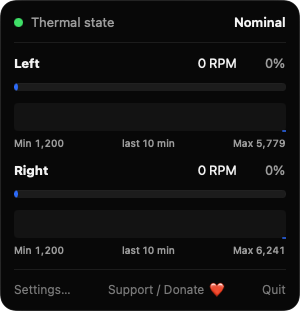
FanSpeedGlance lives in your menu bar and shows live RPM for every fan, plus the system thermal state. Click the item for per-fan gauges and history press Command-comma for Settings.
Free & MIT licensed · Apple Silicon & Intel · Latest release
Features
A narrow monitor that shows what your fans are doing and warns you only when something looks wrong.
Show the highest fan RPM, a fan glyph, or both. Values round to the nearest 10 and use fixed-width digits so the status item stays steady.
The popover lists each fan with its current RPM, percent of maximum, a gauge, and its minimum and maximum speed. Two-fan Macs show Left and Right.
A short rolling history for each fan makes spin-ups easy to spot. It is kept in memory only and never written to disk.
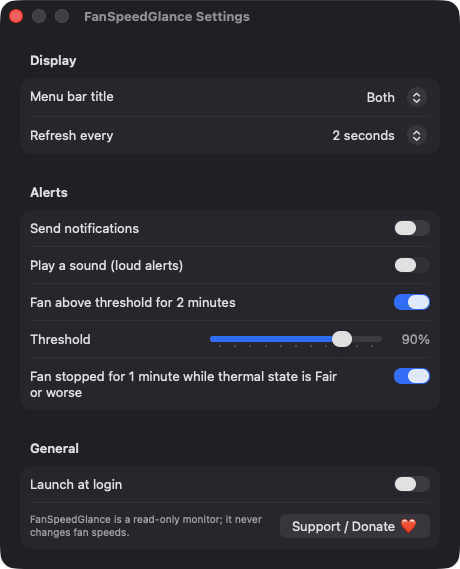
Get warned when a fan stays above your chosen percent of its maximum for over two minutes, or reads 0 RPM for a minute while the system is running warm. Notifications are off by default, with an optional sound.
It never writes fan speeds, installs no helper tool and needs no root access. Fanless Macs like the MacBook Air show the thermal state instead.
Refresh every 1, 2 or 5 seconds. Polling pauses when the popover is closed and nothing else needs live data. Launch at login is optional.
Screenshots
Install
FanSpeedGlance is open source and not notarized with a paid Apple Developer ID, so macOS needs one extra step the first time.
xattr -cr /Applications/FanSpeedGlance.app
Download
Free, forever. Built for macOS 14 Sonoma or newer, Apple Silicon and Intel.
Not notarized: on first launch right-click FanSpeedGlance.app → Open.
FAQ
Yes. It is released under the MIT license, has no ads, no accounts and no paid tier. The full source is on GitHub, and if you find it useful you can support development through the Ko-fi button in the app.
None to read fan speeds, which uses read-only calls to the AppleSMC service. Notification permission is requested only if you enable alerts, and a login item is added only if you enable Launch at login. It never asks for Accessibility, Screen Recording or Microphone access.
Your settings are stored locally in the app's standard preferences. The ten-minute fan history lives in memory only and disappears when you quit. The app talks to no server.
Notarization requires a paid Apple Developer account, and this is a free project. Right-click the app and choose Open once to approve it, or build it yourself from source with Xcode.
Yes. FanSpeedGlance was generated by Claude Code from a written spec as a clean-room reimplementation, with no code or assets from any commercial app. The full source is on GitHub under MIT, so you can read every line before you run it. It has had less human review than a hand-written app, so bug reports are welcome.
Support ❤️
FanSpeedGlance is a free, open-source alternative to paid utilities. If it earns a spot on your Mac, a coffee keeps the updates coming.
☕ Support Or on Ko-fi