Time in every thermal state
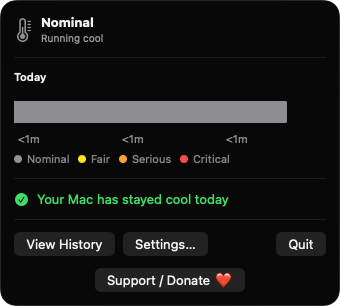
Each change between nominal, fair, serious and critical is logged with timestamps. Today's stacked bar shows your share of time in each state.
Open source · macOS 14+ · Universal binary · System Monitoring
HeatLedgerBar lives in your menu bar and records every change in your Mac's thermal state, then names the apps behind each hot period. Click the thermometer to see today at a glance.
Free & MIT licensed · Apple Silicon & Intel · Latest release
Features
It tracks the official macOS thermal state over time instead of reading private temperature sensors.
Each change between nominal, fair, serious and critical is logged with timestamps. Today's stacked bar shows your share of time in each state.
While your Mac is at fair or worse, per-process CPU is sampled every 10 seconds. Each hot period lists the frontmost app and the heaviest apps.
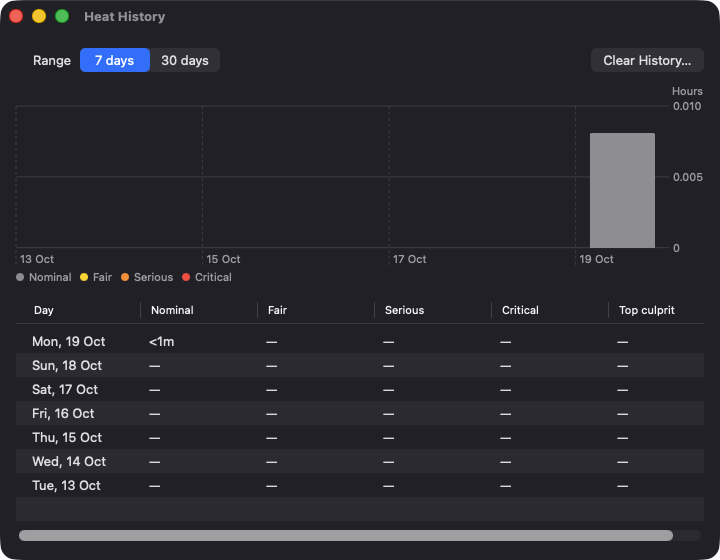
A history window charts time per state over 7 or 30 days, with a per-day table and the top culprit for each day.
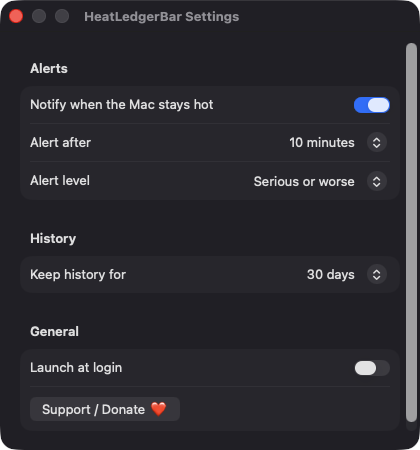
Get a notification when your Mac stays hot for 5, 10 or 20 minutes, naming the heaviest app. You get at most one alert per hot period.
The icon is tinted gray, yellow, orange or red to match the current thermal state, so you can check it without opening anything.
History is a JSON file on your Mac, kept for 7, 14 or 30 days. There are no accounts and nothing is sent anywhere.
Screenshots
Install
HeatLedgerBar is open source and not notarized with a paid Apple Developer ID, so macOS needs one extra step the first time.
xattr -cr /Applications/HeatLedgerBar.app
Download
Free, forever. Built for macOS 14 Sonoma or newer, Apple Silicon and Intel.
Not notarized: on first launch right-click HeatLedgerBar.app → Open.
FAQ
Yes. It is free, released under the MIT license, and the full source is on GitHub. If you find it useful, there is an optional Support button that opens a Ko-fi page.
Only notifications, which are optional and used for hot-Mac alerts, plus a login item if you turn on Launch at login. It does not ask for Accessibility, Screen Recording, Location or Full Disk Access.
In a JSON file at ~/Library/Application Support/HeatLedgerBar/ on your Mac. Nothing leaves your machine, and you can erase it at any time with Clear History in Settings.
Notarization requires a paid Apple Developer account. Right-click the app and choose Open once to get past Gatekeeper, or build it yourself from source with Xcode.
Yes. HeatLedgerBar was generated by Claude Code from a written spec as a clean-room reimplementation, with no code or assets from any commercial app. The full source is on GitHub under MIT, so you can read every line before you run it. It has had less human review than a hand-written app, so bug reports are welcome.
Support ❤️
HeatLedgerBar is a free, open-source alternative to paid utilities. If it earns a spot on your Mac, a coffee keeps the updates coming.
☕ Support Or on Ko-fi