Global hotkey, your choice
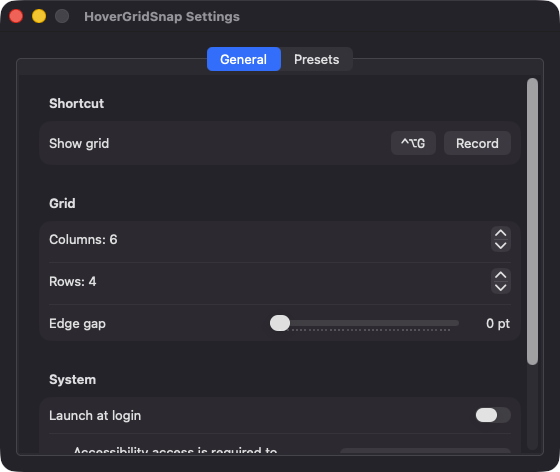
Toggle the grid from any app with Control-Option-G by default. Record a different shortcut in Settings and see an inline error if it is unavailable.

Open source · macOS 14+ · Universal binary · Window Management
Press Control-Option-G to pop up a small grid under your pointer, then click or drag across cells. The front window snaps to that exact rectangle when you let go.
Free & MIT licensed · Apple Silicon & Intel · Latest release
Features
A compact, native window manager that does one thing well and stays out of your Dock.
Toggle the grid from any app with Control-Option-G by default. Record a different shortcut in Settings and see an inline error if it is unavailable.
Click one cell to fill it, or drag across several to span a rectangle. A translucent live preview shows where the window will land before you release.
Choose 1 to 12 columns and rows (6 by 4 by default) and set an edge gap from 0 to 40 points between the window and the screen edge.
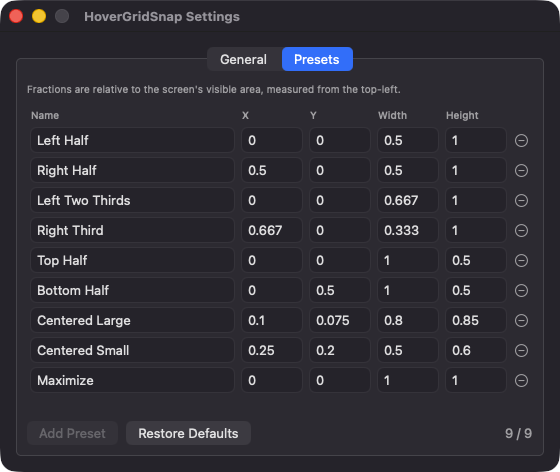
Left Half, Right Third, Centered Large and more are stored as fractional rectangles you can edit. Apply them from the menu bar with keys 1 to 9 or from the grid footer.
Windows land on the screen under your pointer and respect the menu bar and Dock. Placement uses points, so mixed Retina and non-Retina setups behave.
No Dock icon, no account, no network access and no telemetry. Press Esc or click outside to close the grid, and optionally launch at login.
Screenshots
Install
HoverGridSnap is open source and not notarized with a paid Apple Developer ID, so macOS needs one extra step the first time.
xattr -cr /Applications/HoverGridSnap.app
Download
Free, forever. Built for macOS 14 Sonoma or newer, Apple Silicon and Intel.
Not notarized: on first launch right-click HoverGridSnap.app → Open.
FAQ
Yes. It is released under the MIT license and the full source is on GitHub. There are no accounts, subscriptions or paywalls, and an optional Support button links to Ko-fi if you want to chip in.
Only Accessibility, which is how macOS lets an app read the front window and set its position and size. Without it the grid will not open. It does not request Screen Recording, Microphone or Camera access, and the global hotkey needs no extra permission.
Settings and presets are saved locally in the app's UserDefaults on your Mac. Nothing is sent anywhere, because the app has no backend and makes no network connections.
Notarization requires a paid Apple Developer account, and this is a free project. Right-click the app and choose Open once to approve it, or build it yourself from source with Xcode.
Support ❤️
HoverGridSnap is a free, open-source alternative to paid utilities. If it earns a spot on your Mac, a coffee keeps the updates coming.
☕ Support Or on Ko-fi