Custom names and emoji
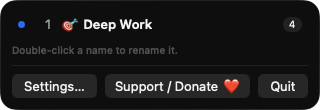
Double-click a Space in the dropdown to rename it and add an optional emoji prefix. Names are saved per Space, so reordering in Mission Control keeps them correct.

Open source · macOS 14+ · Universal binary · Menu Bar Utility
SpaceNameBar shows the current Space and its custom name in the menu bar. Open the dropdown to rename Spaces, add an emoji, and click any row to jump straight there.
Free & MIT licensed · Apple Silicon & Intel · Latest release
Features
Everything lives in one menu bar item, with no accounts, servers or network access.
Double-click a Space in the dropdown to rename it and add an optional emoji prefix. Names are saved per Space, so reordering in Mission Control keeps them correct.
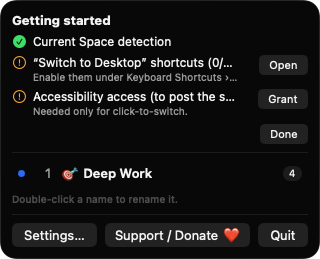
Click a row to jump to that Space. The app posts your own Switch to Desktop N shortcuts, and clicking a full-screen Space activates that app.
An optional badge shows how many app windows live on each Space. It uses only window bounds and owner information, never contents or titles.
By default the list shows the Spaces of the display with the menu bar. A setting lists every display, and up to 16 Spaces are handled.
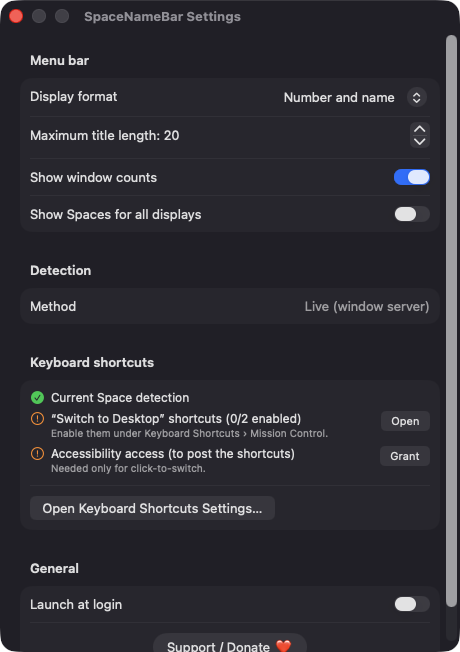
Display the number, the name, or both, and set a maximum title length from 5 to 40 characters. Launch at login is a single toggle.
Built with SwiftUI and AppKit, with no analytics and no network connections. If Space lookup is unavailable after a macOS update, it falls back to the Dock's saved layout and tells you in Settings.
Screenshots
Install
SpaceNameBar is open source and not notarized with a paid Apple Developer ID, so macOS needs one extra step the first time.
xattr -cr /Applications/SpaceNameBar.app
Download
Free, forever. Built for macOS 14 Sonoma or newer, Apple Silicon and Intel.
Not notarized: on first launch right-click SpaceNameBar.app → Open.
FAQ
Yes. It is released under the MIT license and the full source is on GitHub. There are no accounts, subscriptions or paid tiers, and an optional Ko-fi button is the only way to support it.
Only Accessibility, and only for click-to-switch, because the app posts the Control plus number shortcuts that make macOS change Space. Without it, the menu bar name, renaming and everything else still work. It does not ask for Screen Recording or Microphone access.
Space names, emoji and settings are stored locally in your macOS user defaults, keyed by Space identifier. Nothing is sent anywhere, because the app makes no network connections.
Notarization requires a paid Apple Developer account, and this is a free project. Right-click the app and choose Open once to approve it, or build it from source with Xcode.
Support ❤️
SpaceNameBar is a free, open-source alternative to paid utilities. If it earns a spot on your Mac, a coffee keeps the updates coming.
☕ Support Or on Ko-fi