Live signal, noise and rate
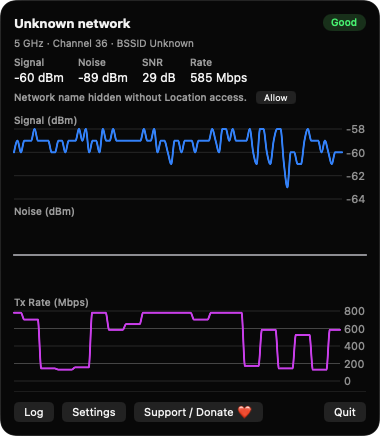
Three stacked charts show signal, noise and transmit rate, polled every 1, 2 or 5 seconds. Keep 15 minutes, 30 minutes or an hour of history.

Open source · macOS 14+ · Universal binary · System Monitoring
WifiRoamLog lives in your menu bar, graphs Wi-Fi signal, noise and transmit rate live, and logs every roam and channel change. Click the menu bar item to open it.
Free & MIT licensed · Apple Silicon & Intel · Latest release
Features
Everything you need to debug flaky wireless, running natively on your Mac with no server and no account.
Three stacked charts show signal, noise and transmit rate, polled every 1, 2 or 5 seconds. Keep 15 minutes, 30 minutes or an hour of history.
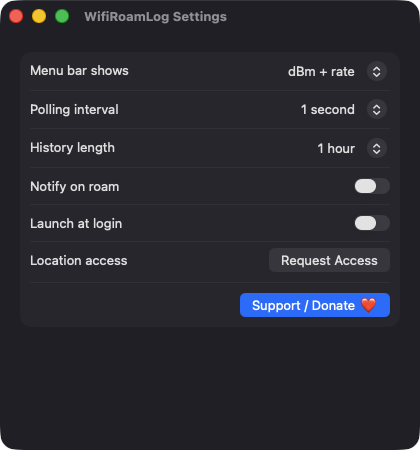
Show dBm and rate, a percentage, or a quality rating. The popover adds network name, band, channel, BSSID and SNR.
Network switches, roams between access points, channel and band changes, connects, disconnects and wake from sleep are recorded with old and new values.
The log window lists events newest first and can be cleared or exported to a plain-text file. It is capped at 10,000 entries.
Turn on notifications to be told when your Mac roams or changes channel, so you can match drops to the moment they happened.
Signal-to-noise ratio is mapped to Poor, Fair, Good or Excellent. Launch at login is available in Settings.
Screenshots
Install
WifiRoamLog is open source and not notarized with a paid Apple Developer ID, so macOS needs one extra step the first time.
xattr -cr /Applications/WifiRoamLog.app
Download
Free, forever. Built for macOS 14 Sonoma or newer, Apple Silicon and Intel.
Not notarized: on first launch right-click WifiRoamLog.app → Open.
FAQ
Yes. It is released under the MIT license and the full source is on GitHub. There are no ads, accounts or telemetry, and an optional Ko-fi button is the only way to support it.
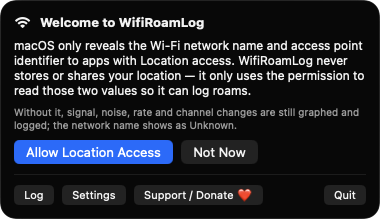
Location (When In Use) is requested because macOS hides the Wi-Fi network name and BSSID from apps without it your location is never read or stored. Without it, signal, noise, rate and channel changes are still graphed and logged. Notifications and login item access are only used if you enable those options.
Only on your Mac. The event log is a JSON lines file at ~/Library/Application Support/WifiRoamLog/events.jsonl, and nothing is sent to any server.
Notarization requires a paid Apple Developer account, which this free project does not have. Right-click the app and choose Open once to launch it, or build it from source with Xcode.
Yes. WifiRoamLog was generated by Claude Code from a written spec as a clean-room reimplementation, with no code or assets from any commercial app. The full source is on GitHub under MIT, so you can read every line before you run it. It has had less human review than a hand-written app, so bug reports are welcome.
Support ❤️
WifiRoamLog is a free, open-source alternative to paid utilities. If it earns a spot on your Mac, a coffee keeps the updates coming.
☕ Support Or on Ko-fi