Global stash and unstash hotkeys
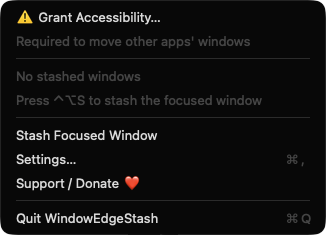
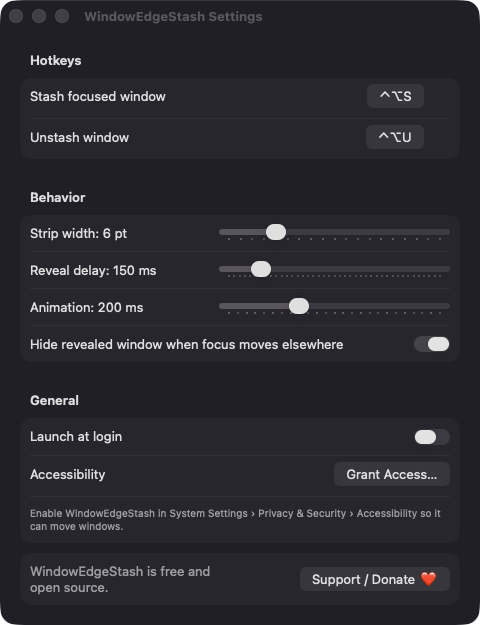
Stash the focused window with Control-Option-S and restore it with Control-Option-U. Both hotkeys can be re-recorded in Settings.

Open source · macOS 14+ · Universal binary · Window Management
Press Control-Option-S to stash the focused window at the nearest screen edge, leaving a thin strip visible. Rest your pointer on the strip and it slides out move away and it slides back.
Free & MIT licensed · Apple Silicon & Intel · Latest release
Features
WindowEdgeStash does only edge stashing, and gives you control over how it behaves.
Stash the focused window with Control-Option-S and restore it with Control-Option-U. Both hotkeys can be re-recorded in Settings.
Rest the pointer on the strip for your chosen delay and the window slides into view, raised and focused. It slides back when the pointer leaves.
Stash as many windows as you like. Strips on the same edge stack so each one keeps its own hover area.
Edges that border another display are skipped, so a window is never stashed into the space between your screens.
Set strip width from 2 to 20 points, reveal delay up to 1000 ms and animation duration up to 600 ms. Optionally hide windows when focus moves to another app.
The menu lists stashed windows by app and title, each with Unstash, plus Unstash All. A subtle line highlights the edge while you hover a strip.
Screenshots
Install
WindowEdgeStash is open source and not notarized with a paid Apple Developer ID, so macOS needs one extra step the first time.
xattr -cr /Applications/WindowEdgeStash.app
Download
Free, forever. Built for macOS 14 Sonoma or newer, Apple Silicon and Intel.
Not notarized: on first launch right-click WindowEdgeStash.app → Open.
FAQ
Yes. It is released under the MIT license and the full source is on GitHub. There is no account, no server and no analytics, and you can build it yourself with Xcode.
Accessibility, which it uses to read and move other apps' windows. Launch at login is optional and only registered if you turn it on. It does not request Screen Recording, camera, microphone or network access.
Your settings are stored locally in the app's preferences on your Mac. The list of stashed windows lives only in memory, so every stashed window is restored to its original position when you quit the app.
Notarization requires a paid Apple Developer account, which this free project does not have. Right-click the app and choose Open once to launch it, or build it from source with Xcode.
Support ❤️
WindowEdgeStash is a free, open-source alternative to paid utilities. If it earns a spot on your Mac, a coffee keeps the updates coming.
☕ Support Or on Ko-fi